Master the use of video chapters & timestamps to optimize user experience, improve SEO, and get your video segments featured in Google's search snippets.
In the ever-growing landscape of online video content, simply uploading a video isn't enough to capture and retain an audience. To truly stand out, creators must focus on optimizing their content not just for search engines, but primarily for the viewer. This is where strategic use of Video chapters and timestamps becomes a critical component of modern video marketing, fundamentally improving the user experience and boosting visibility in search results.
The Power of Video Chapters and Timestamps
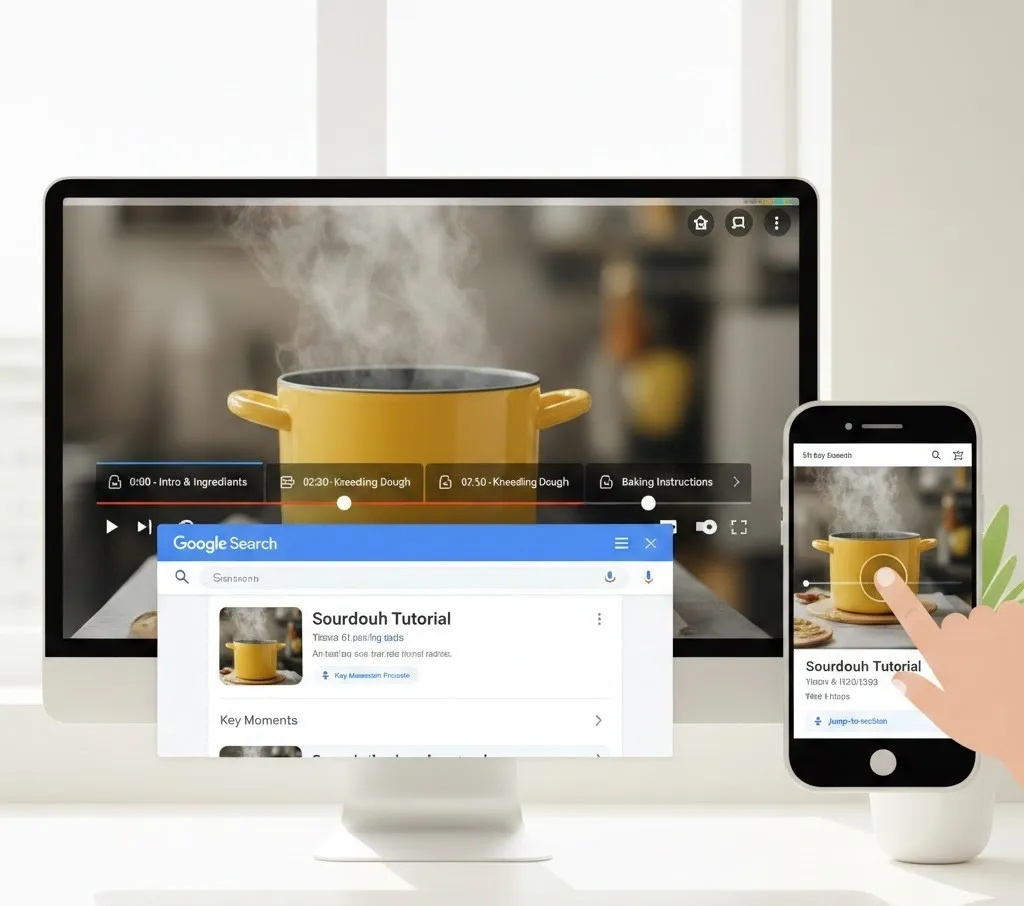
Video chapters act like a digital table of contents for your video. They break a longer piece of content into labeled, digestible segments, with markers appearing directly on the video player's progress bar. These chapters are automatically generated by platforms like YouTube based on the list of timestamps and titles you provide in the video description.
What are Timestamps?
A timestamp is a specific point in time within a video, formatted as a time code (e.g., 0:30, 2:45, or 1:15:00). When you list timestamps followed by a descriptive title in your video's description, they are transformed into clickable links. These links allow viewers to execute a seamless jump-to-section action, instantly transporting them to that exact moment in the video.
Enhancing the User Experience (UX)
The primary benefit of using chapters and timestamps is the significant improvement in the user experience (UX).
- Improved Navigation: For long-form videos, such as in-depth tutorials, webinars, or comprehensive reviews, forcing a viewer to scrub through minutes of content to find a single piece of information is a recipe for high drop-off rates. Chapters provide a navigational roadmap. A viewer can quickly scan the chapter titles to see if the video covers their specific query and then jump-to-section immediately. This efficiency is especially crucial on the go, making the content highly mobile friendly.
- Increased Engagement and Retention: By allowing viewers to efficiently find what they need, you increase the likelihood they will stay on your video longer, even if they skip the intro. Furthermore, a clear, structured video encourages viewers to return later to re-watch a specific part, boosting watch time and audience retention—two key metrics for platforms' algorithms.
- Accessibility: Chapters make content more accessible. Viewers with different learning styles, or those who rely on transcripts or captions, benefit from the clear structural context that chapter titles provide.
How to Make Your Video Appear in Google's Search Snippets
Google's search algorithm often displays video results, especially for "how-to" queries, educational content, and step-by-step tutorials. The presence of clearly defined chapters in your video’s description can lead to an enhanced search snippet, which is a highly visible result that includes links to specific segments of your video. This is how to achieve it:
Meet the Basic Chapter Requirements:
For YouTube to recognize and display your chapters, and for Google to index them, you must adhere to the following strict formatting rules:
- Start at 00:00: The very first timestamp in your list must be 00:00 (or 0:00 for shorter videos) and include a title (e.g., 00:00 - Introduction & Overview). This signals the beginning of your video structure.
- Minimum Chapters: You need a minimum of three timestamps.
- Minimum Length: Each segment/chapter must be at least 10 seconds long.
- Ascending Order: All timestamps must be listed in chronological, ascending order in the description box.
- Correct Formatting: Use the MM:SS - Chapter Title format.
Placement and Visibility:
While chapters appear on the video player, listing them clearly in the description box, preferably near the top, further aids both search engines and the user experience. Users who land on the video’s page can quickly see the entire structure before they even hit play.
The Role of Mobile-Friendly Design
The use of chapters and timestamps is inherently a mobile friendly practice. With a significant portion of video consumption occurring on smartphones, screen real estate and attention spans are limited. The jump-to-section functionality is highly valued on mobile, allowing users to tap a chapter link and get straight to the relevant part without frustrating manual scrubbing on a small touchscreen. Google often prioritizes video content with chapter markers for its mobile search snippets, providing a superior and direct path to the answer.
Best Practices for Implementing Chapters
To maximize the benefits of your chapters, follow these best practices:
- Accuracy is Key: Ensure your timestamps are accurate. A chapter that starts 5-10 seconds too late can confuse the viewer and damage the user experience.
- Descriptive Titles: Keep titles concise but highly descriptive. Aim for clarity and keyword inclusion.
- The "Why" and "What" Videos: Chapters are most effective for educational videos, tutorials, reviews, presentations, and interviews—content where viewers are actively seeking specific information. Short, purely entertainment-focused videos generally benefit less.
- Let Viewers Know: Mention in your video or description that you’ve included chapters and timestamps. Encourage viewers to use them to jump to the most relevant content.