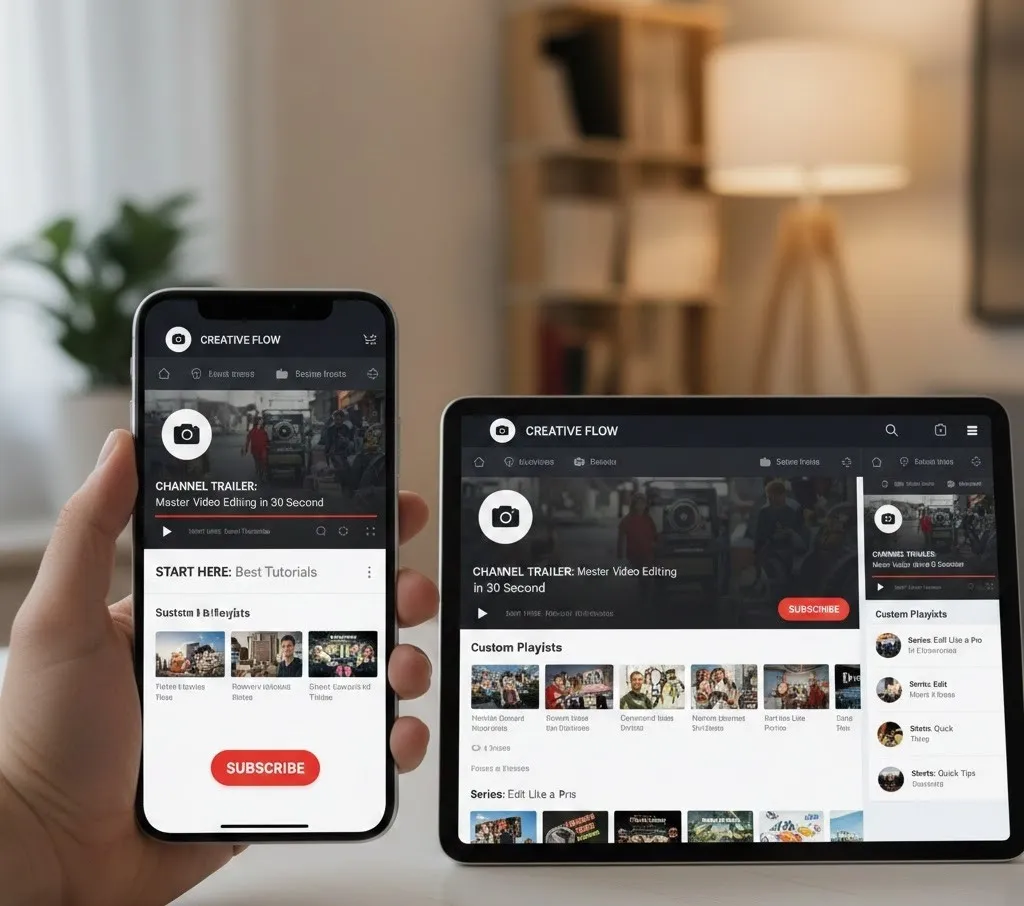
Master your channel layout, featured video, channel trailer, and playlist organization.
The 30-Second Subscriber Strategy: Optimizing Your YouTube Channel for Mobile Newbies
Your YouTube channel homepage is your storefront, and for first-time viewers arriving on mobile, you have less than 30 seconds to make a compelling case for a subscription. In a scroll-heavy, attention-scarce environment, optimizing your Channel layout is critical to converting a curious tap into a loyal click. This guide dives deep into the strategic elements required to build a subscription-converting flow, focusing entirely on the dominant mobile experience.
The Mobile Mindset: You Have 30 Seconds
A mobile viewer has limited screen space and is likely scrolling with a single thumb. They are not patiently navigating a desktop menu. Your goal is instant clarity and a compelling reason to stay. The moment they land on your channel page, they must know three things:
- Who are you? (Your Brand)
- What do you make? (Your Niche/Topic)
- Why should I watch/subscribe? (Your Unique Value Proposition)
Everything in your Channel layout must be designed to answer these questions within the first scroll.
Master Your Consistent Branding (The Top Fold)
The very first elements a mobile user sees are your profile picture, channel name/handle, and banner. This is your primary Consistent branding opportunity.
- Profile Picture: Must be simple, recognizable, and look good as a tiny circle. Use a logo or a high-quality, expressive headshot. On mobile, this is your primary visual identifier.
- Channel Banner: Design your banner for the small mobile "safe zone." The banner should clearly state:
- Your channel's core topic (e.g., "Daily Tech Reviews" or "Simple Vegan Recipes").
- Your value proposition (e.g., "Simplifying the latest gadgets" or "Meals in under 30 minutes").
- Your upload schedule (e.g., "New videos every Tuesday & Friday"). This manages expectations and signals an active channel.
- Channel Name & Description: Ensure your name and the first line of your "About" section are optimized for search and clarity. Include semantic keywords to help YouTube understand your niche.
The Instant Conversion Hook: Channel Trailer and Featured Video
Immediately below your banner, YouTube allows you to highlight two key videos: a channel trailer for non-subscribers and a featured video for returning subscribers. This is the heart of the 30-second conversion flow.
A. The Channel Trailer (For New Subs)
The channel trailer is your 30-to-60-second elevator pitch. When a first-time viewer lands on your page, this is the first thing that autoplays.
- Rule of 5 Seconds: The first five seconds must be a powerful hook. Show a montage of your best, most engaging content clips—visual proof of your quality and value.
- Clarity Over Cutesy: Immediately state what your channel is about, who you help, and what problem you solve. Use clear, enthusiastic language.
- The Direct Subscribe CTA: Conclude with an explicit subscribe CTA. Tell the viewer exactly what to do and what they gain. Example: "If you want to master video editing, hit that Subscribe button now and let's create!"
B. The Featured Video (For Returning Subs)
The featured video is for those already subscribed. Don't waste this space with an old video. Use it to:
- Highlight your latest high-effort video.
- Showcase a video tied to a current event or launch.
- Link to a strategic, highly-converting video series that encourages binge-watching.
Strategic Content Organization: Playlists as Signposts
On mobile, the viewer scrolls vertically. You must use the "Sections" feature to create a persuasive journey down the page. Playlist organization is how you turn a browsing viewer into a binging viewer, drastically increasing watch time—a key signal to YouTube's algorithm.
The Power of Custom Sections
New viewers need a guided tour, not a messy list of everything. Use the following hierarchy:
- "Start Here: Best of [Your Topic]" (Single Playlist): This is the first section below your trailer. Curate your absolute best content—highest views, best watch time, or most representative of your niche. The goal is to maximize the chance of a click.
- "Series 1: [Problem Solved]" (Single Playlist): Group content by a specific viewer need. If you are a finance channel, this could be "Beginner's Guide to Investing." If you're a cooking channel, "7-Day Meal Prep Challenge."
- "Popular Uploads" (Automatic Section): Let YouTube showcase your most-viewed videos. Social proof is powerful.
- "Shorts" (Automatic Section): Keep this higher up on the mobile feed. Shorts are designed for quick consumption and can easily lead to a full subscription if the content niche is clear.
- "Latest Uploads" (Automatic Section): Keep new content visible, but never as the very first section. New viewers don't care about your latest video if they don't know why they should watch you yet.
Mobile Tip: Keep section titles short, clear, and action-oriented (e.g., "Grow Your Business," not "Videos About Business Growth").
The Invisible Subscribe CTA Strategy
While YouTube has a clear red "Subscribe" button, you need to embed a mental and visual subscribe CTA throughout the homepage experience.
- Visual Watermark: Use the Branding section in YouTube Studio to add a custom video watermark (typically 150x150 pixels) that appears in the corner of all your videos. Make it a simple, eye-catching 'Subscribe' graphic.
- Video End Screens: Every featured video in your playlists should end with a powerful end screen that includes a clickable element to subscribe.
- Channel Links in Banner: In the customization settings, you can add links to your channel banner. Use one of these to link to a special, *pre-subscribed* URL to your own channel (This is an advanced tactic that ensures the visitor sees the 'Subscribe' confirmation immediately after clicking).
- About Section: The very first line of your "About" section must contain a direct subscribe CTA and clearly define your value. This is visible on mobile without a 'Show More' click.
The Mobile QA and Testing Loop
The final, and most neglected, step is quality assurance. Desktop customization does not translate perfectly to mobile.
- Test on Multiple Devices: Check your Channel layout on an iPhone, an Android phone, and a tablet. Look for banner clipping, unreadable text, and how the featured video thumbnail displays.
- The "Incognito" Test: Always view your channel in a browser's incognito mode (or logged out of YouTube) on your phone. This is the experience your new potential subscriber will have. Time yourself: can you clearly understand the channel's purpose and be persuaded to click "Subscribe" in under 30 seconds?
- Check Analytics: Use your YouTube analytics to track two key metrics for your channel homepage:
- Channel Page Views: How many people are landing on your customized page?
- Subscribers Gained (from Channel Page): This is the ultimate metric for success. If this number is low, you need to adjust your channel trailer or playlist organization.
By treating your Channel layout as a focused, mobile-first sales funnel—using a strong channel trailer, embedding consistent branding, organizing content with persuasive playlist organization, and including multiple subscribe CTA elements—you can drastically increase your new subscriber conversion rate and build a thriving community.